
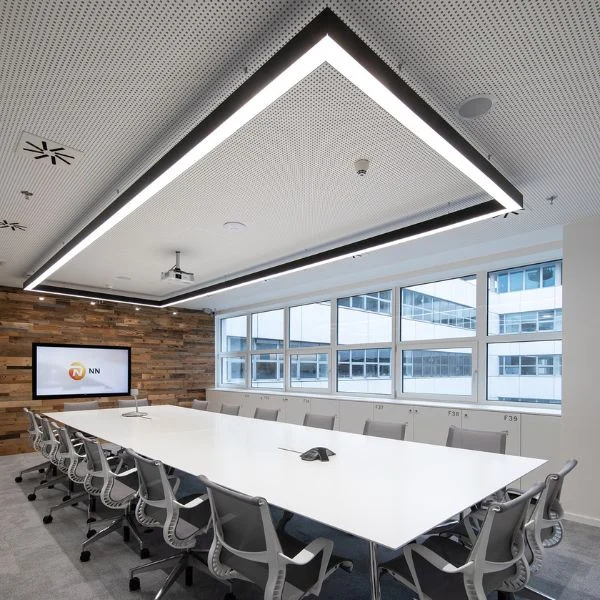
Did you know that poor workspace lighting is one of the leading causes of afternoon fatigue and eye strain?
Most businesses treat illumination as an afterthought, but getting your office lighting design right is a massive competitive advantage. It directly impacts your team’s focus, mood, and daily productivity.
As a space planner who has redesigned dozens of commercial environments, I know that slapping high-powered LEDs on a ceiling isn’t enough. You need a strategic approach that balances color temperature (CCT), minimizes blinding glare (UGR), and creates an adaptable environment for both deep focus and collaborative meetings.
In this comprehensive Office Lighting Design Guide, I’m breaking down the exact layout strategies, smart control systems, and lumen calculations you need to transform your workspace.
Let’s dive right in.
Introduction to Modern Office Lighting Design
Modern office lighting design is no longer just about illuminating a physical space; it is a strategic tool that directly influences workplace productivity, employee well-being, and operational efficiency. As businesses transition to agile and hybrid work environments, traditional, one-size-fits-all lighting layouts fall short. High-quality office lighting design harmonizes architectural aesthetics with human-centric functionality, creating an environment where teams thrive.
Why Effective Office Lighting Matters
Effective office lighting is a critical asset for the modern global enterprise. It acts as a silent driver of organizational performance, impacting both the physiological and psychological comfort of employees. Poor lighting choices lead to eye strain, fatigue, and decreased focus, while a well-executed design mitigates these risks entirely.
- Boosts Productivity: Proper illumination levels maintain high alertness and cognitive function during peak work hours.
- Enhances Employee Well-being: Thoughtful design reduces headaches and absenteeism by respecting human circadian rhythms.
- Supports Workplace Safety: Clear, well-distributed light prevents accidents in high-traffic zones and communal areas.
Key Benefits of LED Office Lighting Upgrades
Upgrading to a premium LED office lighting system delivers immediate, measurable returns on investment. Global organizations leverage commercial LED technology to achieve sustainability goals while simultaneously improving the visual quality of their workspaces.
| Feature | Legacy Lighting (Fluorescent/Halogen) | Modern LED Upgrades | Business Impact |
|---|---|---|---|
| Energy Efficiency | High consumption, significant heat waste | Up to 70% less energy consumption | Drastically lowers utility overhead |
| Operational Lifespan | 10,000 – 15,000 hours; frequent replacements | 50,000 – 100,000 hours | Eliminates ongoing maintenance costs |
| Light Control & Quality | Flickering, fixed brightness, poor color rendering | Flicker-free, dimmable, superior CRI | Maximizes visual comfort and focus |
| Sustainability | Contains mercury; higher carbon footprint | Eco-friendly, recyclable components | Aligns with corporate ESG mandates |
Fundamental Concepts of Office Lighting Quality
An effective office lighting design guide must prioritize visual comfort and functionality over simple brightness. Achieving high-quality illumination requires balancing technical metrics to support focus and reduce eye strain.
Understanding Color Temperature (CCT) and Color Rendering (CRI)
Color temperature and color rendering dictate how a space feels and how accurately colors appear.
- Correlated Color Temperature (CCT): Measured in Kelvin (K). For general office areas, a neutral to cool white light (3500K–4000K) boosts alertness and productivity. Warm light (2700K– 3000K) works best for breakrooms and hospitality zones.
- Color Rendering Index (CRI): Measures a light source’s ability to reveal the true colors of objects. A CRI of 80 or higher is the standard for workspaces, while design departments require a CRI of 90+ for precise color tasks.
Achieving Balanced Illuminance vs Maximum Brightness
More light does not equal better light. Blasting a workspace with maximum brightness leads to fatigue and headaches.
| Lighting Metric | Definition | Target Goal for Offices |
|---|---|---|
| Illuminance | The amount of light falling on a surface. | 300 to 500 lux on desks. |
| Brightness (Luminance) | The light reflected off surfaces toward the eye. | Controlled to prevent harsh glare. |
We focus on delivering targeted illuminance where tasks happen, rather than over-lighting the entire room.
The Importance of Light Uniformity Across Workspace Zones
Light uniformity prevents the eyes from constantly readjusting between bright and dark areas. Sudden drops in light levels across a row of desks cause cognitive fatigue.
To maintain proper uniformity, fixtures must be spaced evenly. For accent zones or transition areas, using architectural fixtures like sleek wall spot lights helps bridge the gap between ambient illumination and focal walls, eliminating distracting shadows. Aim for a uniformity ratio of at least 0.6 in dedicated task areas to ensure a seamless visual environment.
Managing Glare and Visual Comfort (UGR) in Office Lighting Design
Employee productivity drops significantly when poor light placement causes eye strain, headaches, and fatigue. Managing glare is a critical pillar of any comprehensive office lighting design guide, ensuring the workspace remains comfortable for long hours of computer work.
Understanding Direct and Indirect Glare Sources
Glare happens when excessive brightness enters the field of vision, making it difficult to see clearly. In a commercial workspace, glare comes in two forms:
- Direct Glare: Light hitting the eyes straight from a high-output, unshielded fixture or raw sunlight coming through a window.
- Indirect Glare (Reflective): Light bouncing off smooth surfaces like polished desks, whiteboards, or glossy computer monitors.
What Is Unified Glare Rating (UGR) and Why It Matters
Unified Glare Rating (UGR) is an international scale measuring the psychological glare of a light fixture in an indoor environment. UGR values range from 10 to 30:
| UGR Range | Comfort Assessment | Office Suitability |
|---|---|---|
| UGR < 16 | High visual comfort | Ideal for technical drawing and high-focus tasks |
| UGR 16 – 19 | Standard comfortable zone | Recommended maximum for general offices |
| UGR > 19 | Noticeable distraction and strain | Unacceptable for workstations; okay for corridors |
To maintain a productive environment, we prioritize low-glare fixtures. Utilizing advanced optical solutions, like a modular LED linear track light with lens, allows you to direct light precisely onto work surfaces without scattering harsh glare into the eyes of your team.
Solutions for Reducing Computer Screen Glare
Most modern modern office spaces rely heavily on computers, making screen reflections a constant battle. You can eliminate screen glare and improve visual comfort with a few strategic adjustments:
- Implement Indirect Lighting: Use fixtures that bounce light off the ceiling rather than pointing straight down. This creates soft, ambient illumination.
- Position Fixtures Correctly: Align linear lights parallel to or between rows of desks instead of directly above a worker’s head.
- Use Matte Finishes: Choose matte paint for walls and satin finishes for office furniture to diffuse potential reflections.
- Incorporate Micro-Prismatic Diffusers: Upgrade your overhead layouts to fixtures with specialized diffusers that restrict high-angle light, keeping the UGR well under 19.
A Functional Approach to Office Lighting Layouts
A one-size-fits-all approach to an office lighting design guide always falls short. To create an environment that boosts productivity and minimizes fatigue, we must treat the workspace as a dynamic ecosystem. This requires a strategic layout that balances overall illumination with targeted light sources.
Layering Ambient, Task, and Accent Lighting
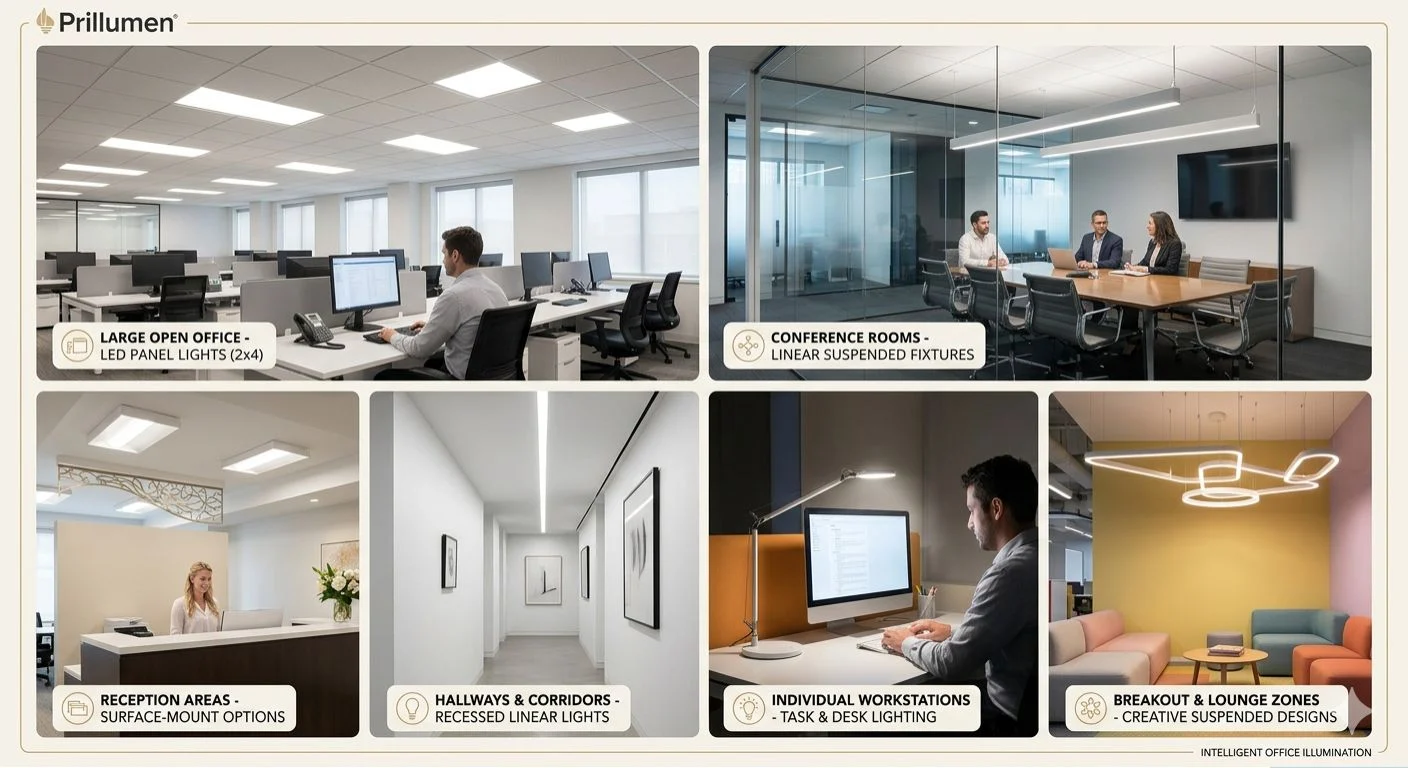
We design effective workspaces by layering three distinct types of light:
- Ambient Lighting: Provides the foundational, overall illumination for the room. It ensures safe movement and a baseline level of brightness throughout the entire office.
- Task Lighting: Focuses light exactly where work happens. Adjustable desk lamps or dedicated under-cabinet fixtures allow employees to customize illumination for reading, writing, or typing.
- Accent Lighting: Adds depth and visual interest to architectural features, company logos, or breakout zones. For adaptable, modern architectural accenting, integrating a magnetric track sphere light provides both a sleek aesthetic and directional flexibility.
Illuminating Ceilings and Walls for Openness
Dark ceilings and walls create a restrictive, cave-like atmosphere that drains employee energy. By directing a portion of the light upward and toward vertical surfaces, we create a sense of openness.
Wall washing and ceiling bouncing make smaller offices feel spacious and significantly reduce the harsh contrast between bright computer screens and dark backgrounds. This simple layout adjustment improves overall visual comfort across the floor plan.
Optimizing Light Fixture Placement Over Desks
Improper fixture placement leads to shadows and glare. We recommend positioning linear fixtures parallel to the window wall and offset from the desks, rather than directly over an employee’s head.
| Desk Lighting Placement | Impact on Workspace |
|---|---|
| Directly Overhead | Creates harsh shadows on paper and screen glare. |
| Behind the Worker | Casts the worker’s own shadow over their paperwork. |
| Offset / Side-angled | Delivers clean, uniform light across the task area without glare. |
This deliberate placement ensures that light hits the workspace at an angle, eliminating distracting reflections on monitors and maximizing focus.
Designing for Diverse Office Zones and Functions
Every modern workspace consists of distinct areas that require specialized illumination. A one-size-fits-all approach fails to meet the practical demands of different daily operations.
Lighting for Focus and Deep Work Areas
Open offices and dedicated desks require high-clarity illumination that minimizes eye strain during long hours of computer work.
- Illuminance: Aim for a consistent 300 to 500 lux on the work surface.
- Color Temperature: Use 4000K crisp white light to maintain high alertness and focus.
- Fixture Choice: Linear pendants combined with direct task lighting provide the best results. For streamlined layouts or utilitarian workspaces, installing a high-quality integral LED batten offers clean, shadow-free illumination across rows of workstations.
Lighting for Meeting Rooms and Collaboration Spaces
Conference rooms must adapt quickly to changing activities, from intense brainstorming sessions to video presentations.
- Flexibility: Implement dimmable control zones to lower light levels during screen sharing.
- Color Temperature: A neutral 3500K to 4000K balance keeps energy high without feeling clinical.
- Configuration: Use a central fixture over the main table for core visibility, complemented by perimeter accent lighting to prevent dark corners.
Lighting for Reception Areas and Breakrooms
First-impression zones and relaxation areas need an inviting atmosphere that contrasts with high-focus workstations.
| Zone | Recommended CCT | Light Level | Vibe |
|---|---|---|---|
| Reception & Lobby | 3000K – 3500K | Moderate (200 lux) | Professional, welcoming, prestigious |
| Breakrooms & Cafes | 2700K – 3000K | Low-Moderate (150 lux) | Relaxing, hospitality-focused, warm |
For these architectural spaces, we utilize specialized layouts like a track light in false ceiling arrangement. This allows you to aim directional spotlights precisely at artwork, reception desks, or architectural features, creating visual depth and a premium feel for clients and team members alike.
Calculating Office Lighting Requirements
Getting the math right prevents a workspace from feeling like a dim cave or a blinding operating room. We use established industry baselines to ensure your office lighting design guide strategy delivers the exact amount of light required for peak productivity.
Recommended Illuminance Standards and Footcandles
Different tasks require different light levels. Illuminance is measured in Lux (lumens per square meter) or Footcandles (fc).
Here is the standard baseline we use for modern office layouts:
| Workspace Zone | Recommended Illuminance (Lux) | Recommended Footcandles (fc) |
|---|---|---|
| Open Offices & Desks | 500 Lux | 50 fc |
| Conference & Meeting Rooms | 300–400 Lux | 30–40 fc |
| Corridors & Passageways | 100 Lux | 10 fc |
| Breakrooms & Lounges | 150–200 Lux | 15–20 fc |
The Lumen Method for Estimating Fixture Needs
To calculate how many fixtures your space actually needs, we use the Lumen Method. This formula determines the total lumens required based on the room’s square footage and target illuminance.
The basic formula is:
Total Lumens = Target Luxtimes Area (Square Meters)Coefficient of Utilization} times tLight Loss Factor
Once you have the total lumens, simply divide that number by the lumen output of a single light fixture to get the total fixture count. For open-plan layouts or commercial areas with high ceilings, utilizing high-efficiency big box store lighting setups or continuous commercial LED runs ensures you hit these targets efficiently without cluttering the ceiling.
Accounting for Light Loss Factors and Room Coefficients
Light levels decrease over time. To ensure your office remains properly lit years down the road, your calculations must account for environmental variables:
- Coefficient of Utilization (CU): This measures how efficiently the fixtures transfer light to the work plane. It depends on the room’s dimensions and the reflectivity of your walls and ceilings.
- Light Loss Factor (LLF): This accounts for realistic depreciation, including Lamp Lumen Depreciation (LLD) as the LEDs age, and Luminance Dirt Depreciation (LDD) caused by dust buildup on the lenses. We typically use an LLF multiplier of 0.80 to 0.85 to future-proof the design.
Implementing Smart Lighting Controls
Smart controls are no longer optional in a modern office lighting design guide; they are the backbone of energy efficiency and workplace adaptability. By upgrading from static switches to intelligent networks, you gain absolute authority over how and when your workspace is illuminated.
Intelligent Control Systems for Energy Efficiency
Implementing intelligent control systems allows us to slash operational costs while optimizing the workspace environment. These systems use granular data to automate illumination based on real-time occupancy.
- Occupancy Sensing: Sensors automatically dim or turn off lights in vacant zones like conference rooms, corridors, and restrooms.
- Scheduling: Program custom lighting profiles that align with standard business hours, shifting to low-power security modes after dark.
- Data Analytics: Track energy consumption patterns to continuously refine your facility’s efficiency strategies.
For areas that require flexible, clean wiring layouts alongside high-tech control integration, modern architectural solutions like magnetic linear track lights offer the ideal infrastructure to snap in smart fixtures and adjust spacing on the fly.
Automated Dimming and Daylight Harvesting
Natural light changes constantly throughout the day. Automated dimming bridges the gap between raw sunlight and artificial light, maintaining a stable visual environment without wasting electricity.
- Daylight Harvesting: Photosensors measure incoming ambient sunlight near windows and automatically dial back the output of nearby LED fixtures.
- Task-Tuning: Set maximum brightness thresholds to prevent over-lighting, which extends the lifespan of your fixtures and prevents eye strain.
- Smooth Transitions: Dimming occurs gradually, making the shifts completely imperceptible to employees focused on deep work.
Office Lighting Design Checklist and Next Steps
Executing a flawless office lighting design requires moving from the drawing board to installation without losing sight of energy efficiency, compliance, and visual comfort. Use this structured approach to finalize your commercial workspace upgrade.
A Quick Checklist for Project Planning
Before purchasing any fixtures, run through this comprehensive checklist to ensure your project aligns with modern workplace standards:
- Illuminance Targets: Confirm desk areas achieve 300 to 500 lux, while corridors and breakrooms rest at a comfortable 100 to 150 lux.
- Glare Control: Verify that all selected workspace fixtures maintain a Unified Glare Rating (UGR) of less than 19 to prevent eye strain.
- Color Quality: Ensure main work zones utilize a Color Rendering Index (CRI) of 80+ (preferably 90+) and a crisp color temperature between 3500K and 4000K.
- Energy & Controls: Integrate daylight sensors and automated dimming to slash utility costs and meet local building energy codes.
- Maintenance & Durability: Map out your layout using reliable, long-lasting commercial units. For specialized utility spaces, storage areas, or covered outdoor pathways within the office complex, integrating durable weather-proof LED batten lights keeps maintenance overhead to an absolute minimum.
Selecting the Right Fixtures and Partners
The success of your Office Lighting Design Guide rollout comes down to hardware quality and manufacturer support. Partnering with a trusted supplier guarantees that the components you install today will perform reliably for years to come.
| Partner Selection Criteria | What to Look For | Why It Matters |
|---|---|---|
| Photometric Data | Verified IES files | Ensures accurate layout mapping and prevents under-lighting. |
| Smart Compatibility | 0-10V or DALI dimming protocols | Allows seamless integration with smart sensors and building automation. |
| Warranty & Lifespan | Minimum 5-year warranty with L70/B50 ratings | Minimizes replacement costs and operational disruptions. |
| Supply Chain Reliability | Direct manufacturer access and robust inventory | Avoids costly project delays during the installation phase. |
Look for manufacturers that offer complete transparency in their testing data and provide flexible, architectural-grade options. Choosing the right partner ensures your office transition is smooth, cost-effective, and optimized for long-term productivity.
STAY IN THE LOOP
Subscribe to our free newsletter.
Leave A Comment
Retrofit LED Lighting Solutions Are soaring energy bills, relentless ballast [...]

Struggling to cut operational costs while upgrading your facility’s lighting [...]
The Financial & Operational Business Case Upgrading to energy efficient [...]
Are you worried about overhead head clearance, or tired of [...]